1
Virtual Office Setup
📧 Setting Up Your Email
Create a professional Gmail account dedicated to your business. Make sure it looks professional — avoid nicknames or personal emails. (Example: jdoe.agent@gmail.com). Then watch the video below to set up your email signature using the free HubSpot generator.
Create Your Email Signature →
📱 Setting Up Your ClearBadge Account
ClearBadge is the software we use to get clients on video and build credibility. It also serves as your digital business card. Set up your account and profile before you start taking calls.
Set Up ClearBadge →
💬 Setting Up Telegram
Telegram is our primary communication platform for team updates, announcements, and support. Download the app and join the Flyer Life Group channels.
Download Telegram →
🖥️ Using the Equis Site
Learn to fall in love with the technology provided by our IMO. The Equis dashboard is your hub for managing policies, tracking production, and accessing resources.
Go to Equis Site →
🗺️ How to Apply for Non-Resident Licenses
Watch the video below, then apply on NIPR.com. Make sure to talk with your manager about which states make the most sense for your business before applying.
📲 Important: Once your license is issued, save a copy to your computer and take a photo of it to keep on your phone. You'll want it easily accessible when you're on calls — clients may ask to verify your license and being able to pull it up instantly builds trust.
Apply on NIPR.com →
📲 Important: Once your license is issued, save a copy to your computer and take a photo of it to keep on your phone. You'll want it easily accessible when you're on calls — clients may ask to verify your license and being able to pull it up instantly builds trust.
🤝 Creating Credibility at the Start of an Appointment
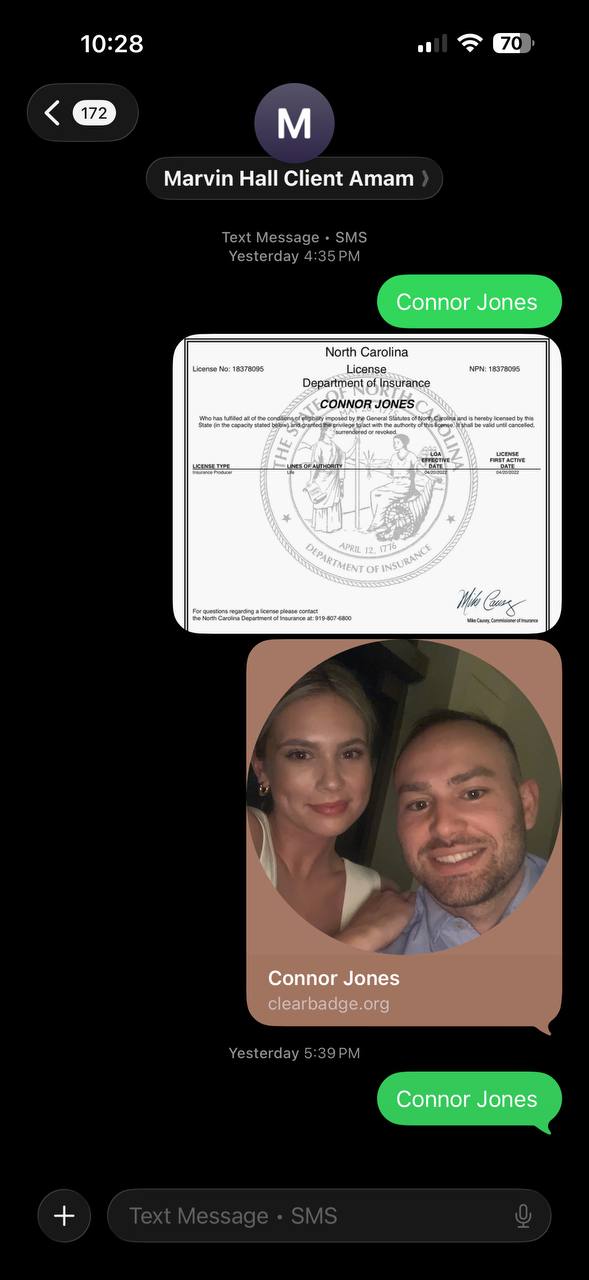
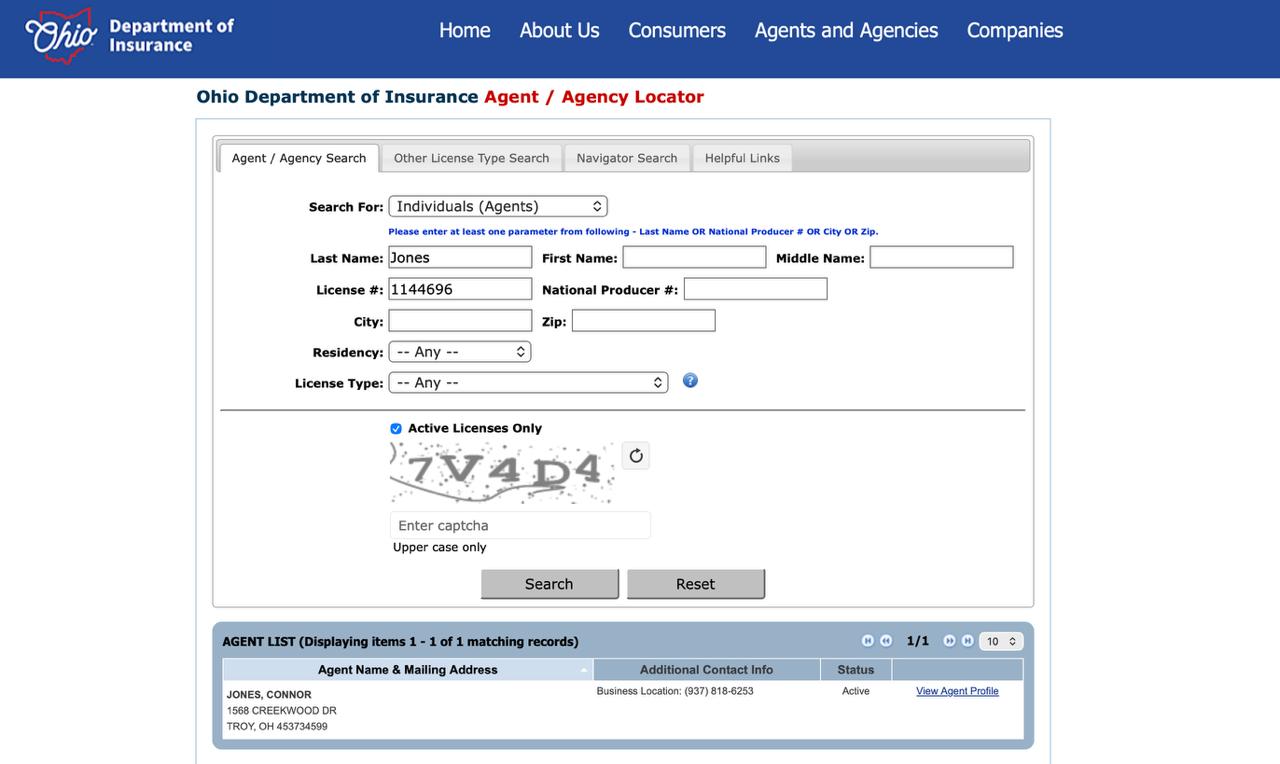
When you get on a call, one of the first things you do is text the client your insurance license so they know exactly who they're working with. This builds instant trust and separates you from every other agent they've talked to. Below is an example of what that looks like, and how to verify your license on the state website.
📱 Example: Texting Your License to a Client
🌐 State Website License Verification
2
Carrier Websites
⚠️ NEVER PUT YOUR PHONE NUMBER ON AN APPLICATION TO SIGN FOR THE CLIENT.
Learn how to navigate each carrier portal and write applications step by step. You must be able to log in and submit applications while the client is still on the phone.
🛡️ Americo
Americo Agent Portal →
🦁 Mutual of Omaha
Mutual of Omaha Portal →
📊 Transamerica
Transamerica Portal →
🏛️ American Amicable
American Amicable Portal →
🌉 Corebridge Financial
Corebridge Financial Portal →
3
Compensation
💰 Understanding Your Compensation Grid
This video explains exactly how you get paid, how commission levels work, and what you need to do to advance your compensation tier.
View Compensation Grid PDF →
📈 Understanding Overrides
Watch the video below.
4
Quoting
💲 How to Use Integrity Connect to Quote
Integrity Connect is our quoting platform. Learn how to pull accurate quotes for clients in real time during your calls. Fast, accurate quoting is essential to closing business efficiently.
Go to Integrity Connect →
🧪 Practice Quoting
Read each client scenario below, go into Integrity Connect, and pull the quote yourself. Then reveal the answer to see if you got it right. This is how you build speed and accuracy before you're on a live call.
📋 Scenario 1
Client: 65-year-old female, Ohio
Tobacco: No (non-smoker)
Height/Weight: 5'8" / 160 lbs
Health: No health issues
Coverage: $10,000
Carrier: Americo — Eagle Select 1
Go into Integrity Connect, run the quote, and record your answer below.
Tobacco: No (non-smoker)
Height/Weight: 5'8" / 160 lbs
Health: No health issues
Coverage: $10,000
Carrier: Americo — Eagle Select 1
Go into Integrity Connect, run the quote, and record your answer below.
📋 Scenario 2
Client: 72-year-old male, Ohio
Tobacco: Yes (smoker)
Height/Weight: 6'0" / 240 lbs
Health: No health issues
Coverage: $25,000
Carrier: Mutual of Omaha — Living Promise
Go into Integrity Connect, run the quote, and record your answer below.
Tobacco: Yes (smoker)
Height/Weight: 6'0" / 240 lbs
Health: No health issues
Coverage: $25,000
Carrier: Mutual of Omaha — Living Promise
Go into Integrity Connect, run the quote, and record your answer below.
📋 Scenario 3
Client: 76-year-old female, Ohio
Tobacco: No (non-smoker)
Height/Weight: 5'2" / 140 lbs
Health: No health issues
Coverage: $7,000
Carrier: Americo — Eagle Select 2
Go into Integrity Connect, run the quote, and record your answer below.
Tobacco: No (non-smoker)
Height/Weight: 5'2" / 140 lbs
Health: No health issues
Coverage: $7,000
Carrier: Americo — Eagle Select 2
Go into Integrity Connect, run the quote, and record your answer below.
5
Inbound Call System
🦅 What Are Falcon FEX Inbounds?
Falcon inbounds are live, inbound final expense calls routed directly to you. These are pre-qualified prospects who responded to a TV or digital ad and are expecting a call about life insurance coverage. This is not cold calling — the client is already interested. Your job is to build rapport, run them through the script, quote them, and close.
Sign Up for Falcon FEX Inbounds →
📝 The Falcon FEX Script
The Falcon FEX script is your roadmap on every inbound call. Know it cold before you go live. Each section has a purpose — rapport, fact-finding, underwriting, quote, and close. Inbound calls move fast. Script hesitation kills conversions.
⬇️ Download Falcon FEX Script →
⬇️ Download FEX Needs Analysis →
🎯 Real Closing — Connor Jones
Live call clip — Gold, Silver & Bronze presentation through the close. Listen to how Connor walks the client through the options and locks in the recommendation.
🎯 Real Closing #2 — Connor Jones
Another live closing clip — Gold, Silver & Bronze presentation through the close with a different client.
🎯 Full Presentation — Connor Jones
Live full call from Connor Jones — open to close including plan presentation and recommendation. Client info muted.
🎯 Full Presentation — Alex Cherry
Live full call from Alex Cherry — plan presentation, price walk-through, and close. Client info muted.
🔄 Objection Handling
How to handle price pushback, “I need to think about it”, and other common objections — coming soon.
🎯 How to Use the Call Critique System
The Call Critique System analyzes your recorded calls and gives you a score out of 100. Submit your calls regularly to track improvement and compete on the leaderboard.
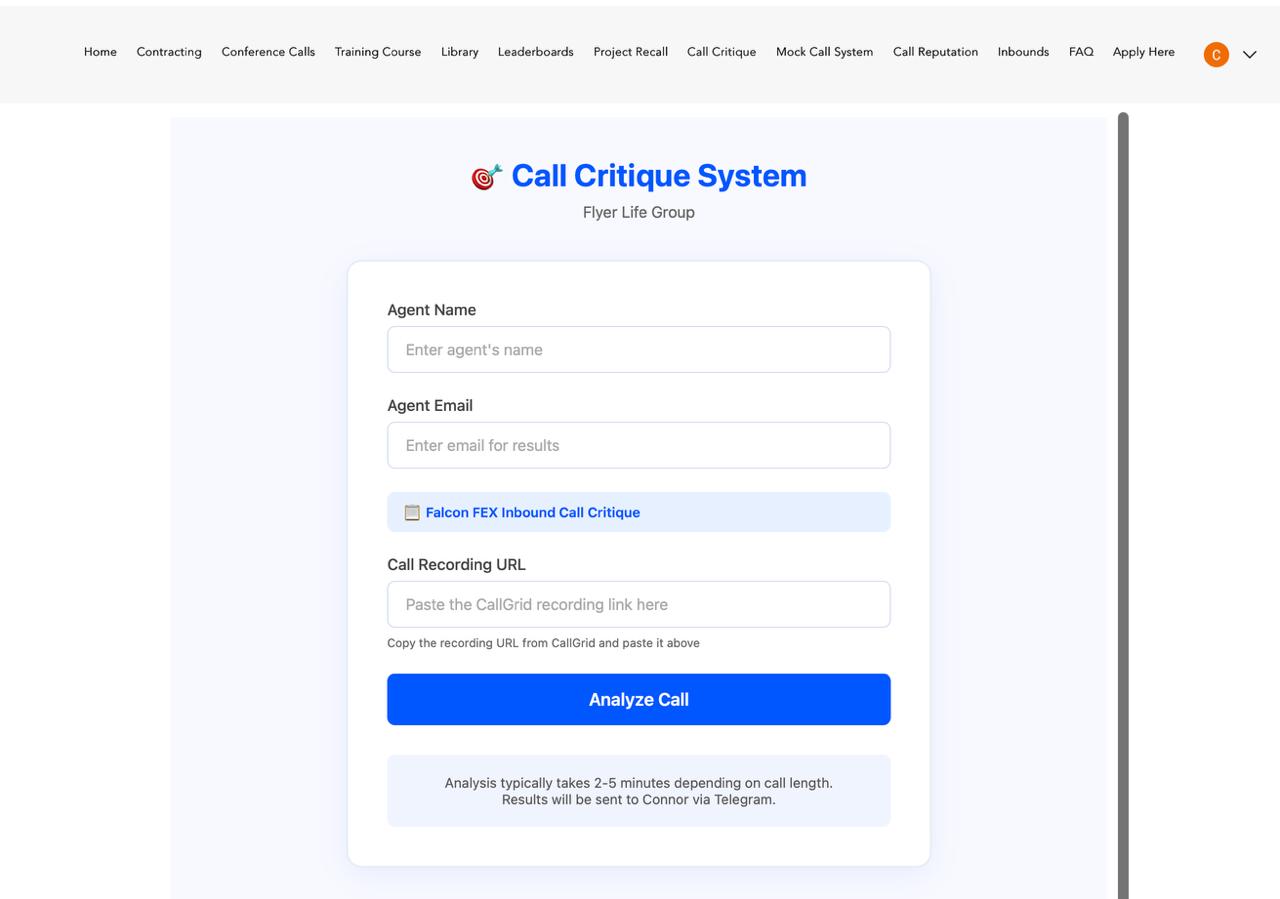 Submit a Call for Critique →